 Neel Thakkar
Slack and Salesforce help businesses manage collaboration, customer information, sales, and service workflows. However, employees often need to switch between both platforms to access information or complete tasks.
Salesforce Hosted MCP Servers provide a modern way for AI assistants to interact with Salesforce through natural-language requests. When connected with Slack, they can bring CRM information and approved Salesforce actions closer to everyday conversations.
"Related reading: For a broader look at Slack and Salesforce, read How Slack Improves Business Productivity and Salesforce Collaboration"
This guide explores how Salesforce Hosted MCP Servers connect Slack with Salesforce, including the architecture, setup, security, use cases, and implementation best practices.
What Are Salesforce Hosted MCP Servers?
To understand how to connect Slack to Salesforce using Hosted MCP Servers, it is important to first understand the Model Context Protocol.
Understanding the Model Context Protocol
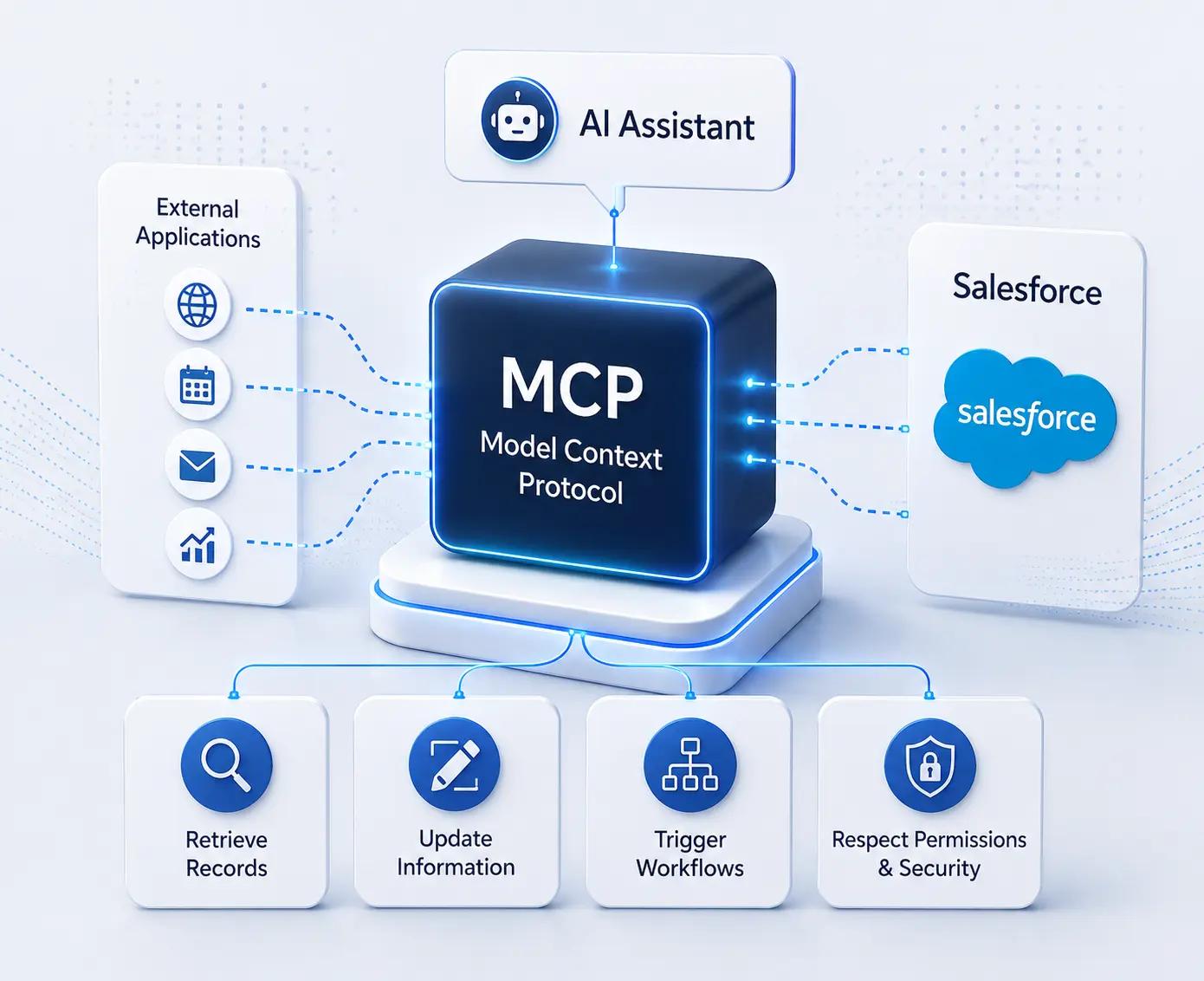
- MCP provides a standardized way for AI assistants to interact with external tools, applications, and business systems through a common communication framework.
- Instead of creating separate integrations for every AI application, organizations can expose approved business capabilities through a single standardized protocol.
- MCP acts as a communication layer between AI assistants and platforms such as Salesforce, allowing AI to request information or perform supported business actions.
- AI assistants can use MCP to access relevant business information while working within the permissions and security controls of the connected platform.
- MCP can support different business actions, including retrieving records, updating information, and triggering approved workflows based on user requests.
- Employees can use natural-language requests instead of manually navigating through multiple business applications to find information or complete routine tasks.
- By providing a standardized approach, MCP can help organizations build more scalable AI-powered integrations as their business and technology needs evolve.
Why Did Salesforce Introduce Hosted MCP Servers?
- As businesses adopt more AI applications, connecting those applications securely to Salesforce can become increasingly complex.
- Traditional integrations can work well for system-to-system communication, but AI-powered workflows introduce additional requirements.
- AI assistants need a standardized way to discover and use approved business capabilities while operating within existing security and permission models.
- Salesforce Hosted MCP Servers provide a managed approach for connecting AI applications with Salesforce.
They address several challenges associated with traditional AI integrations.
1. Complex AI Integrations
- Without a standardized approach, organizations may need to separate APIs, middleware, or connectors for different AI applications.
- As the number of AI tools increases, maintaining those integrations can become more difficult and expensive.
- MCP provides a common protocol that can reduce the need for separate integration logic for every AI application.
2. Security and Authentication
- AI applications need controlled access to enterprise data.
- Hosted MCP Servers can work with Salesforce's existing authentication, permissions, sharing rules, and field-level security so that AI interactions remain aligned with the user's authorized access.
3. Infrastructure and Maintenance
- Building a custom MCP environment can require hosting, monitoring, maintenance, and ongoing updates.
- With Salesforce Hosted MCP Servers, Salesforce manages the hosted MCP infrastructure, reducing the infrastructure responsibilities organizations would otherwise have to handle themselves.
4. Standardized Communication
- Different AI applications can require different integration approaches.
- MCP provides a standardized communication model between AI applications and business systems, making it easier to develop scalable AI-powered workflows.
5. Enterprise Governance
- Organizations need to consider security, permissions, governance, and compliance when introducing AI into business workflows.
- Hosted MCP Servers are designed to operate within Salesforce's existing platform security and governance framework.
Why Connect Slack to Salesforce Using MCP?
- Access Salesforce data directly from Slack without constantly switching between applications to find customer, opportunity, case, or activity information.
- Use natural-language requests to interact with Salesforce, allowing employees to ask questions and receive relevant CRM information within their ongoing Slack conversations.
- Connect conversations with real-time CRM context so sales, service, and other teams can work with the same customer information while collaborating.
- Go beyond information retrieval with AI-powered actions, such as creating cases, updating opportunities, assigning tasks, or logging meeting notes through supported Salesforce capabilities.
- Reduce repetitive manual work and application switching, helping employees spend less time navigating systems and more time focusing on important business activities.
- Support faster business decisions by making relevant Salesforce information available when teams are discussing customers, opportunities, or operational issues.
- Maintain Salesforce security and permissions while enabling AI-powered access, so users can work with CRM information according to their existing authorization.
- Create a scalable foundation for AI-driven workflows by using MCP as a standardized connection between AI assistants and Salesforce instead of building separate integrations for every AI use case.
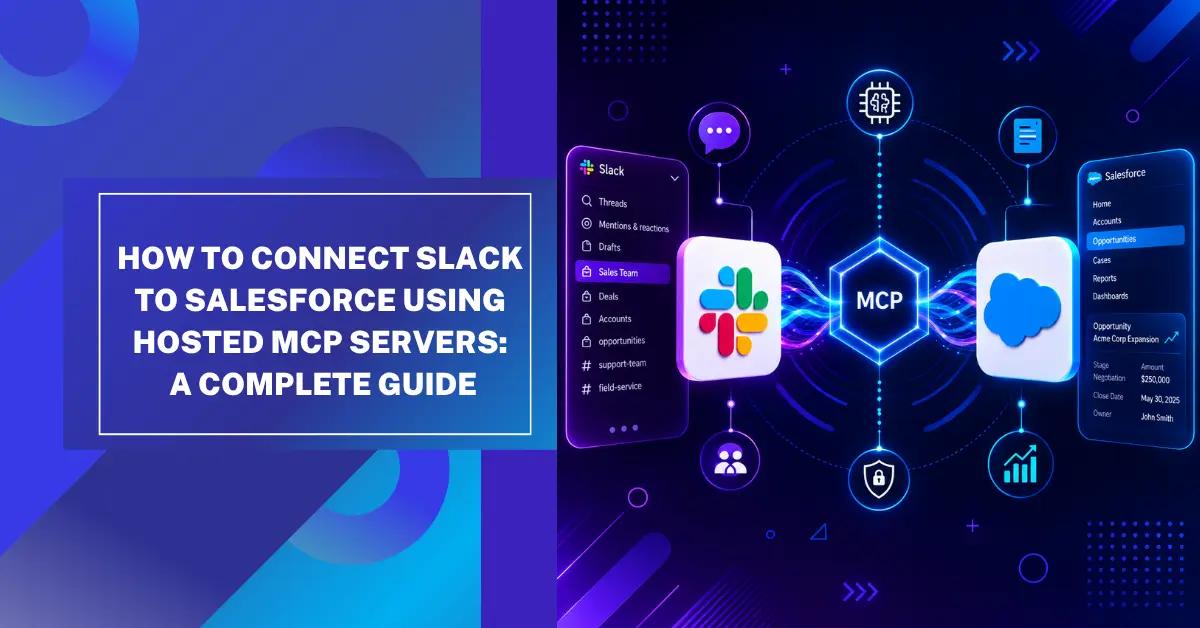
How Slack Salesforce Integration Works With Hosted MCP Servers
- From Slack Request to Salesforce Action: A Connected MCP Workflow
Employee → Slack → AI Assistant → Hosted MCP Server → Salesforce → Response → Slack
- Each stage plays an important role in connecting Slack Salesforce Integration with AI-powered Salesforce workflows.
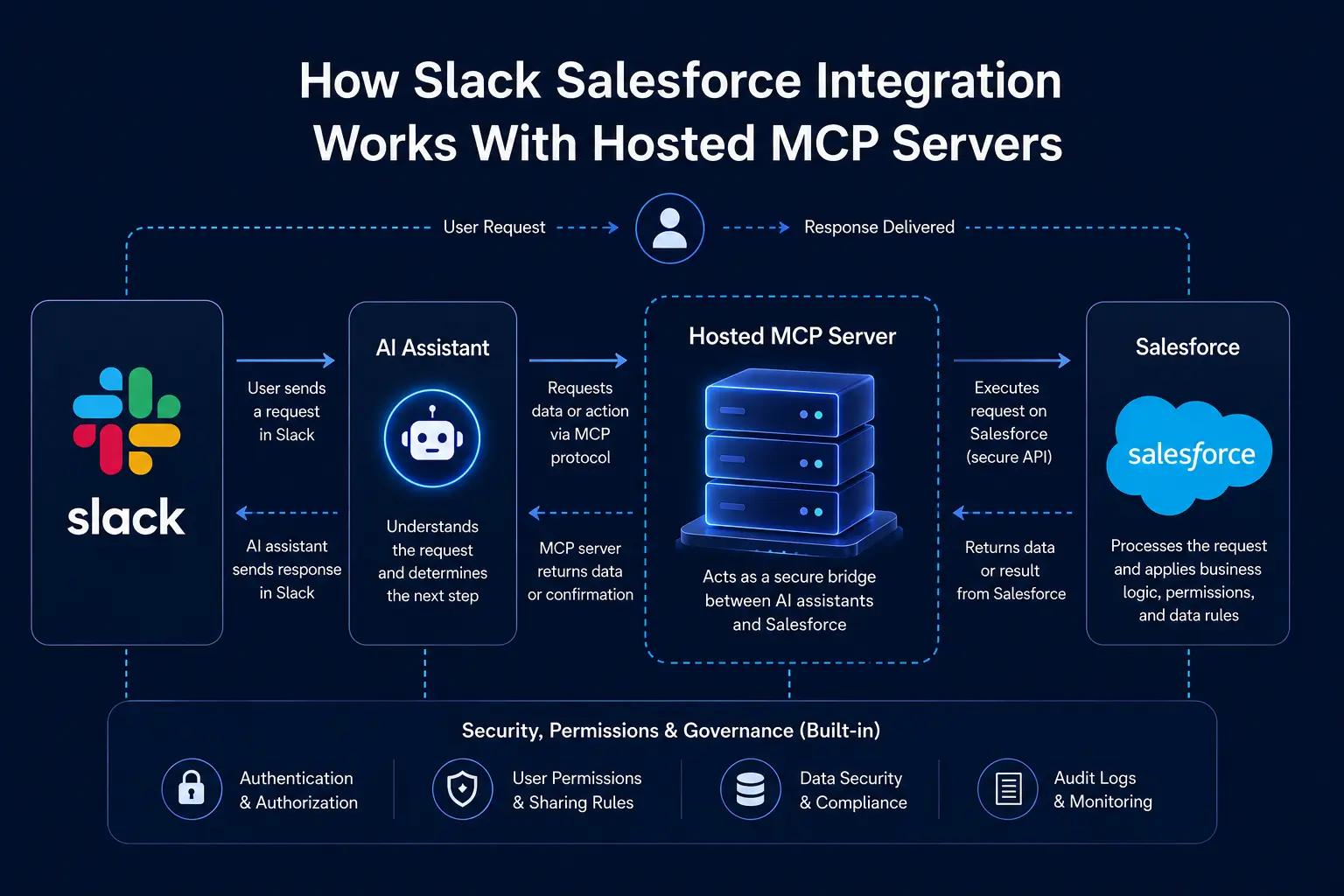
1. Slack
- Slack acts as the conversational workspace where employees can interact with Salesforce using natural-language requests.
- Employees can ask questions about opportunities, accounts, cases, or customer information without repeatedly opening Salesforce.
- A sales representative might ask, “Show me the opportunities closing this week,” directly within Slack.
- Teams can also request customer context, such as “Summarize the Acme account,” while continuing their existing conversation.
- This makes Slack the starting point for a more connected Slack Salesforce integration experience.
2. AI Assistant
- The AI assistant interprets the employee's request and identifies what Salesforce information or action is needed.
- It determines whether the request requires retrieving information, analyzing CRM data, or performing an approved Salesforce action.
- The assistant identifies the relevant Salesforce object, such as an Account, Opportunity, Case, or Task.
- It then determines which available Salesforce capability, or MCP tool can fulfill the user's request.
- For example, “Update the opportunity stage to Proposal” requires an action on a Salesforce Opportunity rather than a simple information lookup.
3. Hosted MCP Server
- The Salesforce Hosted MCP Server acts as the communication layer connecting the AI assistant with Salesforce.
- It provides approved Salesforce tools and capabilities instead of giving the AI unrestricted access to CRM data and processes.
- The MCP server receives the request and identifies the appropriate Salesforce capability required to complete it.
- It also works with authentication and authorization controls to ensure the request is processed according to the user's access.
- After the operation is completed, the Hosted MCP Server returns the structured Salesforce result to the AI assistant.
4. Salesforce
- Salesforce performs the requested operation using the capabilities made available through the Hosted MCP Server.
- Depending on the configuration, the workflow can interact with Accounts, Opportunities, Cases, Salesforce records, and other CRM data.
- Supported Salesforce capabilities can also involve Flows, Apex logic,Agentforce, and Data Cloud .
- Salesforce processes the request according to the user's existing permissions and configured security controls.
- This allows Salesforce MCP integration to connect AI-powered workflows with CRM data while maintaining the Salesforce security model.
5. Response Back to Slack
- Once Salesforce completes the requested operation, the result is returned to the AI assistant through the MCP workflow.
- The AI assistant interprets the Salesforce result and converts it into a clear, natural-language response.
- Employees can receive relevant CRM information directly inside their Slack conversation instead of manually searching through Salesforce.
- For supported actions, users can also receive confirmation that the requested Salesforce operation has been completed.
- This creates a connected workflow where Slack, AI, Salesforce data, and business actions work together with fewer interruptions.
Understanding the Salesforce MCP Data Flow
The complete Salesforce MCP workflow can be summarized in five stages:
Step 1: Employee Request
- The employee starts the process by asking a question or requesting a Salesforce action directly through Slack.
- The request can involve retrieving CRM information, checking an opportunity, reviewing an account, or performing an approved business action.
Step 2: AI Interpretation
- The AI assistant analyzes the employee's natural-language request and identifies the intended action or information.
- It determines which Salesforce object, data, or capability may be required to fulfill the request.
Step 3: MCP Processing
- The Hosted MCP Server receives the request, validates the user's identity, checks applicable permissions, and identifies the appropriate Salesforce operation.
- It then securely connects the AI request with the approved Salesforce capability required to complete the workflow.
Step 4: Salesforce Action
- Salesforce processes the request using its existing platform capabilities, such as retrieving CRM information or updating an authorized record.
- The operation continues to follow Salesforce's authentication, permissions, and security controls while processing the request.
Step 5: Conversational Response
- After Salesforce completes the operation, the result is returned through the MCP workflow to the AI assistant.
- The AI assistant presents the Salesforce information or action result as a natural-language response directly within Slack.
This flow connects Slack, AI, MCP, and Salesforce in a conversational workflow while maintaining the security and governance controls of Salesforce.
Salesforce Hosted MCP Servers vs Traditional Integrations
MCP does not replace traditional integration technologies. REST APIs, SOAP APIs, middleware, and other integration approaches continue to be useful for predictable system-to-system data exchange.
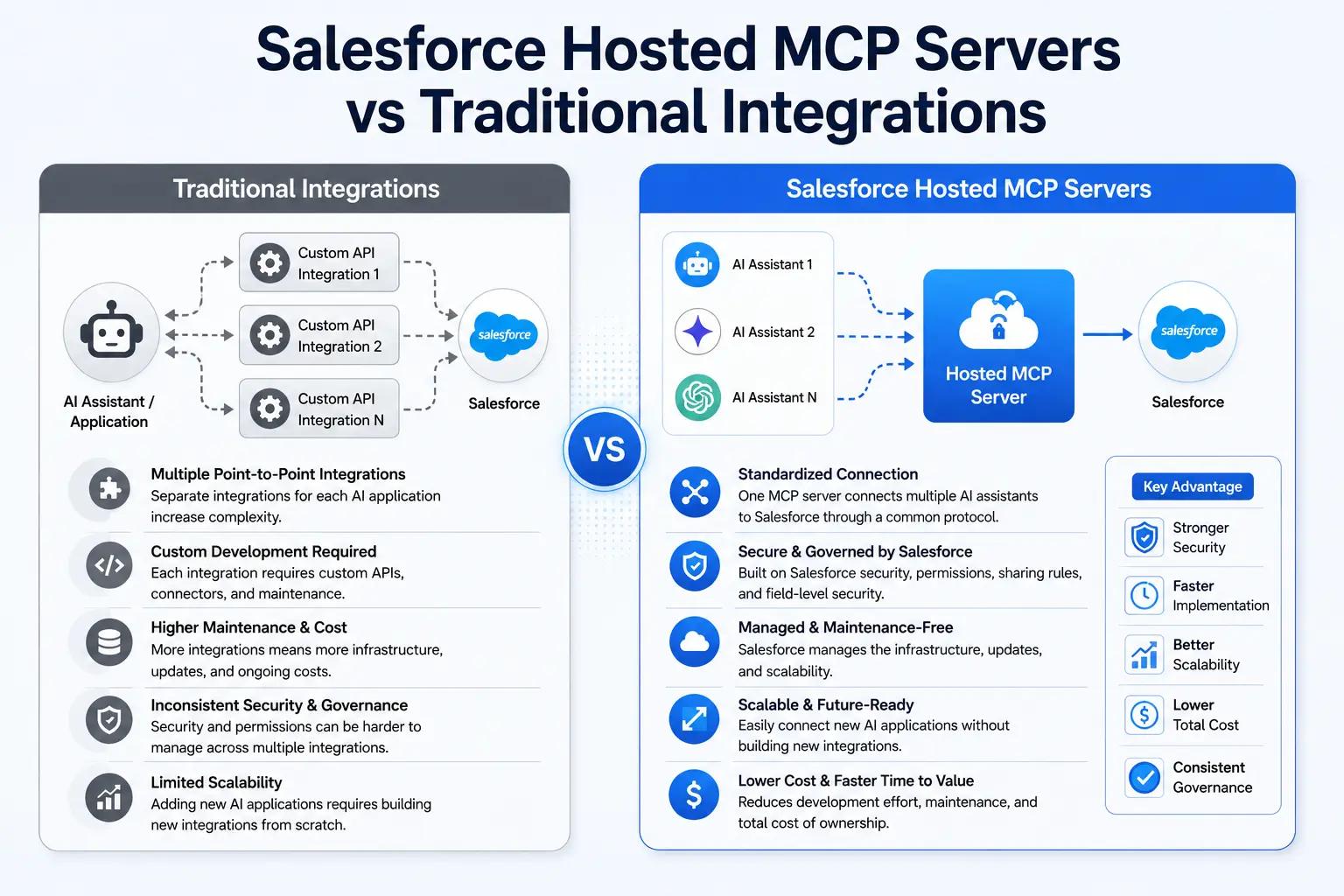
- Traditional integrations are generally designed for application-to-application communication, while Hosted MCP Servers are designed to connect AI assistants with Salesforce capabilities and business systems.
- Traditional integration projects may require custom APIs, middleware, or integration logic, whereas MCP provides a standardized protocol for AI applications to interact with supported Salesforce capabilities.
- AI interaction often requires additional development when using traditional integrations, while Hosted MCP Servers are specifically designed to support AI-driven interactions with business applications.
- Traditional integrations may require separate hosting or middleware infrastructure, while Salesforce Hosted MCP Servers provide a Salesforce-hosted approach for connecting compatible AI clients with Salesforce.
- Security in traditional integrations is typically configured according to the individual integration architecture, while Hosted MCP Servers can work within Salesforce's existing authentication, permissions, and security model.
- As organizations introduce multiple AI applications, maintaining separate custom integrations can become increasingly complex, while a standardized MCP approach can provide a more consistent connection to Salesforce capabilities.
- Traditional integrations often support predefined workflows and specific application-to-application processes, while MCP enables users to interact with supported Salesforce capabilities through natural-language requests.
- The two approaches can work together rather than compete. Traditional integrations can handle established system-to-system requirements, while Hosted MCP Servers can support newer AI-driven workflows involving Salesforce.
How Does Salesforce MCP Handle Security and Authentication?
Security is a critical consideration when connecting AI assistants with Salesforce CRM data. Salesforce MCP should extend existing security controls, not bypass them.
The goal is to ensure that AI-powered requests operate within the same authorization framework that governs the user's Salesforce access.
Authentication
- Hosted MCP Server workflows use Salesforce authentication toestablish the identity of the user making the request.
- OAuth-based authorization canprovide a secure mechanism for connecting applications with Salesforce and controlling access to Salesforce resources.
User-Based Access
- MCP requests should remain associated with the authenticated Salesforce user, allowing the system to apply that user's existing access and permissions.
- Users should only be able to access the Salesforce data and capabilities they are already authorized to use, rather than receiving unrestricted CRM access through the AI assistant.
- For example, a sales representative may access assigned opportunities while being restricted from confidential financial information or records outside their permitted access.
- Similarly, a customer service representative may access customer cases and service information without automatically receiving access to sales forecasts or other restricted business data.
- Role-based access and Salesforce permissions helpmaintain appropriate data boundaries , allowing AI assistants to provide useful CRM information while reducing unnecessary exposure of sensitive data.
- This approach helps organizations introduce Salesforce MCP integration while keeping authentication, authorization, and data access aligned with existing Salesforce security practices.
How Does Salesforce MCP Support Security and Governance?
Before introducing AI-powered access to Salesforce, organizations should review their existing Salesforce security and governance framework to ensure that users and AI-powered workflows have appropriate access to CRM data.
Key security areas should include:
- Object-level permissions to control which Salesforce objects users can access and what actions they can perform.
- Field-level security to restrict access to sensitive fields and prevent unauthorized exposure of confidential CRM information.
- Record-level access to ensure users can access only the Salesforce records permitted by their role and business requirements.
- Sharing rules to define how Salesforce records are shared across users, teams, roles, and organizational groups.
- Permission Sets to provide users with the specific permissions required for their responsibilities without unnecessarily expanding access.
- Role hierarchy to support appropriate record visibility based on organizational structure and reporting relationships.
- Authentication policies to strengthen how users and connected applications authenticate before accessing Salesforce resources.
- Audit and monitoring processes to help organizations track access, identify unusual activity, and maintain visibility into AI-powered Salesforce workflows.
Hosted MCP Servers are designed to work within Salesforce's existing security and governance framework. However, administrators still need to configure permissions and access controls appropriately before enabling AI-powered Salesforce interactions.
AI should strengthen business workflows without weakening the security controls already protecting Salesforce data.
Business Benefits of Slack Salesforce Integration With MCP
1. Faster Access to CRM Information
- Employees can request customer information directly through Slack conversations, without opening multiple Salesforce screens.
- Opportunity details can be accessed quickly while employees continue working within their existing Slack conversations.
- Case information can be retrieved through natural-language requests without manually searching through Salesforce.
- Recent customer activities can be accessed without switching between different applications to gather information.
- Frequently needed CRM information becomes easier to find, helping employees work with relevant data faster.
2. Reduced Manual Work
- Employees can create Salesforce cases through supported natural-language requests instead of entering information manually.
- Opportunity details can be updated through approved Salesforce actions, reducing repetitive data-entry steps.
- Tasks can be assigned from conversational workflows without requiring employees to navigate through multiple Salesforce screens.
- Meeting notes and relevant activities can be logged through supported Salesforce capabilities.
- Routine Salesforce activities can require fewer manual steps, helping employees focus on higher-value work.
3. Better Cross-Functional Collaboration
- Sales teams can share relevant Salesforce information while continuing customer-related discussions in Slack.
- Customer service teams can access case information without leaving conversations where issues are being discussed.
- Customer success teams can work with account context while collaborating with other internal teams.
- Managers can access relevant CRM information when discussing opportunities, customers, or business performance.
- Bringing Salesforce context into Slack conversations can help teams stay aligned around the same customer information.
4. AI-Assisted Decision-Making
- Employees can ask AI assistants to retrieve relevant Salesforce information instead of manually gathering data from different records.
- Sales teams can access opportunity context when discussing pipeline, customers, or upcoming business decisions.
- Customer-facing teams can retrieve relevant account information before responding to customer requirements.
- AI-assisted access can help employees bring relevant CRM context into discussions where decisions are being made.
- Having Salesforce information available through conversational requests can support faster and more informed business decisions.
5. A More Connected Employee Experience
- Employees can access relevant Salesforce information from Slack without constantly switching between different business applications.
- Conversations can remain connected to customer and CRM context instead of requiring employees to search for information separately.
- Teams can work with Salesforce information while staying within the collaboration environment they already use.
- Fewer application switches can make everyday workflows more connected and easier to navigate.
- Connecting Slack, Salesforce, and AI can create a smoother experience between conversation, information, and business action.
Where Can Slack Salesforce MCP Workflows Add the Most Value?
- Sales conversations can become more actionable when employees can access relevant Salesforce opportunity and account context directly while discussing deals in Slack.
- Customer service teams can respond with better context by bringing case information, customer history, and relevant CRM details closer to the conversations where issues are being resolved.
- Managers can make faster decisions by requesting Salesforce information through conversational workflows instead of waiting for teams to manually collect and share CRM updates.
- Cross-functional teams can stay aligned when sales, service, operations, and customer success teams can work with shared Salesforce information within their existing Slack conversations.
- Routine CRM tasks can become less manual when supported Salesforce actions are available through AI-assisted workflows, reducing repetitive navigation and data-entry steps.
- Customer information can become easier to act on when AI assistants help employees retrieve relevant CRM context and surface it at the point where business decisions are being discussed.
- AI-powered collaboration can scale across workflows as organizations identify additional Salesforce capabilities that can be safely exposed through Hosted MCP Servers..
Best Practices for Implementing Salesforce Hosted MCP Servers
Technology alone does not guarantee a successful AI implementation. Organizations should combine the technical setup with security, governance, data quality, employee training, and continuous monitoring.
1. Prioritize Security From the Beginning
- Review Salesforce security before enabling AI access, including authentication, permissions, user roles, and access to confidential CRM information.
- Apply least-privilege access so AI-assisted workflows can use only the Salesforce data and capabilities required for specific business needs.
- Maintain strong authentication and monitoring controls to help protect Salesforce data and identify unusual access or activity.
2. Configure User Permissions Carefully
- Review Profiles and Permission Sets to ensure users receive only the Salesforce access required for their specific responsibilities.
- Check Sharing Rules and Role Hierarchy so AI-assisted requests follow the same record-level access rules that apply to regular Salesforce usage.
- Apply Field-Level Security consistently to prevent AI workflows from exposing sensitive Salesforce fields to unauthorized users.
3. Establish AI Governance Policies
- Define which AI actions and Salesforce objects are permitted , especially when workflows involve sensitive customer or business information.
- Set clear approval requirements for actions that may have significant business impact, such as updating high-value opportunities or critical customer records.
- Establish compliance and audit guidelines covering data usage, retention, monitoring, and human oversight for AI-powered Salesforce workflows.
4. Maintain High-Quality Salesforce Data
- Keep Salesforce records accurate and up to date because AI-powered workflows depend on the quality of the CRM information they access.
- Reduce duplicate and inconsistent records by standardizing data entry, validating important fields, and regularly reviewing CRM data quality.
- Monitor data quality continuously so inaccurate or outdated information does not reduce confidence in AI-generated Salesforce responses.
5. Train Employees on AI-Assisted Workflows
- Teach employees how to write clear and specific prompts so AI assistants can better understand the Salesforce information or action they need.
- Help users understand AI capabilities and limitations, including when Salesforce information should be verified before making business decisions.
- Train employees to protect sensitive information and explain when complex or high-impact requests should be escalated for human review.
6. Monitor Usage and Improve Continuously
- Track user adoption andfrequently used workflows to understand how employees are using Salesforce MCP capabilities in their daily work.
- Monitor response quality and workflow performance to identify inaccurate results, unsuccessful requests, or processes that need improvement.
- Use business outcomes and employee feedback to refine AI-powered workflows and focus future improvements on use cases that deliver measurable value.
What Challenges Should Businesses Consider With Salesforce MCP?
Although Salesforce Hosted MCP Servers can simplify AI-to-Salesforce connectivity, organizations still need to consider several challenges before implementing AI-powered Salesforce workflows.
- Salesforce data quality can directly affect AI responses, as incomplete, outdated, or duplicate customer records may lead to inaccurate information and reduce employee confidence in AI-assisted workflows.
- Security configuration requires careful planning, because incorrect permissions could expose Salesforce information to users who should not have access to it through AI-powered workflows.
- AI accuracy should be evaluated based on the business risk of each workflow, with higher-impact actions involving customer, financial, or operational data requiring greater validation and oversight.
- User adoption may take time, as employees need to understand how to interact with AI assistants, what Salesforce capabilities are available, and when they should verify the information provided.
- Clear AI governance is essential for Salesforce MCP implementations, including rules for data access, permitted actions, human approval, monitoring, and responsibility for AI-assisted workflows.
- Existing Salesforce customizations can affect implementation, so organizations should review their current objects, Flows, Apex logic, integrations, and business processes before introducing MCP-powered workflows.
- Continuous monitoring is necessary after deployment, allowing organizations to identify unsuccessful requests, unexpected behavior, security concerns, and workflows that need further optimization.
The Future of Slack Salesforce Integration With MCP
- MCP can move integrations beyond simple data exchange, allowing AI assistants to interact with Salesforce capabilities through a standardized communication layer rather than only transferring information between applications.
- Slack Salesforce Integration can evolve from notifications to conversational workflows, where employees can interact with Salesforce through the collaboration environment they already use for daily communication.
- The focus can shift from “How can Salesforce send information to Slack?” to “How can employees interact with Salesforce from Slack?”, creating a more natural way to access CRM information and supported business actions.
- AI can bring customer context closer to everyday conversations, helping employees retrieve relevant Salesforce information while discussing customers, opportunities, cases, and other business activities.
- Hosted MCP Servers can support AI-assisted business workflows, connecting conversational AI interactions with Salesforce data and capabilities while working within the platform's existing security and governance framework.
- As organizations adopt AI-powered platforms such asAgentforce , MCP can provide another way to connect AI interactions with Salesforce data and business processes across different workflows.
- The opportunity goes beyond simply connecting Slack and Salesforce—it is about bringing conversation, customer context, AI, and business action closer together in one connected employee experience.
Conclusion
Salesforce Hosted MCP Servers provide a modern way to connect AI assistants with Salesforce capabilities through the Model Context Protocol. With Slack, employees can access CRM information and perform approved actions through conversational workflows, reducing unnecessary switching between applications.
Successful implementation requires strong security, clear AI governance, quality Salesforce data, employee training, and continuous monitoring. The future of Slack Salesforce Integration is moving beyond information sharing toward connecting conversations, CRM data, AI, and business actions.